What are Trending Audios and why are they important for Instagram Reels?
When a sound or song is “trending” on Reels, it usually means its popularity is rising, which is shown by a small arrow next to the audio’s title. Using trending audio is a great way to engage with new audiences and reach new users. Why? Well, Instagram wants to keep users watching content. To do this, the algorithm will prefer content that is either 1) performing well or 2) likely to preform well based on trends. This means that Instagram is more likely to show reels using trending audio to users in their search results than it is to show them reels with other audio or songs that are not “trending.”
Although Instagram hasn’t revealed exactly what qualifies a sound as a trend, we believe it comes down to momentum.
If an audio clip starts getting used or saved frequently in a short period of time, it’s likely to earn the arrow icon — no matter how long it’s been around.
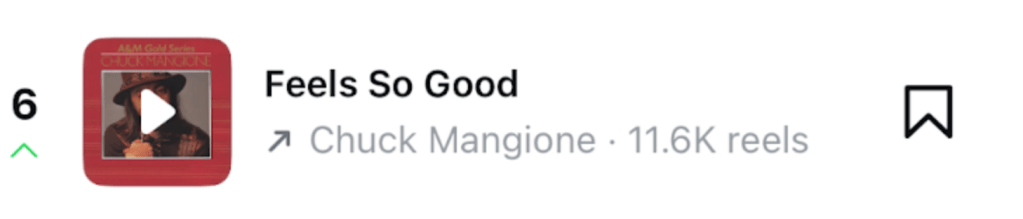
TIP: Keep your eye on that arrow next to the song’s album cover, not the numbers next to the audio. Green means that it is trending upwards. Red means it is falling in trends. Next to the Album cover the song’s title will appear as well as the artist and the number of reels it is currently used in. Keep in mind that that while the most popular trending audio is likely to have larger numbers of reels using it, if you find a trending audio when it is on the rise and has a smaller number of reels using it, you’re more likely to have your reel shown in the audio results.
Can Small Businesses Use Trending Reels Sounds?
If you’ve ever tried to make a Reel for your business account and gotten the dreaded “This sound isn’t licensed for commercial use” message, you’re not alone. Between copyright rules and music licenses, finding trending audio as a small business can feel tricky — but it’s definitely doable.
Here’s the deal: personal and creator accounts get access to Instagram’s full music library, but business accounts are more limited because of copyright laws. If a song is owned by a recording artist, you’ll need a license to use it on a business profile — which is why you see that warning.
The good news? Anything marked as “Original audio” is fair game for business accounts. This includes sounds recorded by other creators, voiceovers, or music people upload themselves. That means you can still tap into trending audio without breaking copyright rules.
At the end of the day, it’s about finding what works for your brand. If you’re ever unsure, it’s worth talking with your team (or just playing it safe with stock music). But don’t let the rules scare you off — there are still plenty of ways to ride trending sounds and grow your small business on Instagram.
Here is a six step How-To guide on how to manage finding trending songs and sounds for your Instagram Reels:
- Start with Your Professional Dashboard
From your profile, tap the three lines (menu) in the top right corner. Select Professional Dashboard.

- Find the “Trending Audio” Section
Inside the dashboard, scroll to the section that says “Reels Trends” or “Trending Audio & Hashtags”. Tap it to open the full list.

- Browse Trending Audio
You’ll see a list of currently trending songs and sounds. Tap any track to preview it. From there, you can save the audio or start creating a reel immediately.

- Use Instagram’s “Audio” Search Feature
Search for a keyword or mood in Instagram’s music library. Audios with lots of recent Reels are usually trending. - Keep an Eye on Sounds that are Trending Upwards
In the Trending Audio section, look for sounds marked with an arrow icon or labeled as “Trending.” These are audio clips that are gaining popularity quickly. Saving or using these sounds early can help your reels ride the trend before it peaks.

- Save or Use the Audio
Tap Save Audio (bookmark icon) to use later. Or tap Use Audio to go straight into the Reels editor with that sound.

For more tips and tricks on how to manage your professional social media follow us on our socials @oliverandco.social!
 Oliver and Co. Social